
Hyperliquid API Guide
Connect your Hyperliquid account to EntryGenius for Copy Trading and DCA Bots. One API key works for both Futures and Spot trading.

⚠️ Before You Start
📋 Requirements
- Fund your wallet first — You need funds in your Hyperliquid wallet before creating an API key
- Sub-accounts NOT supported — Use your main Hyperliquid account only
- One API key for everything — The same key works for both Futures and Spot
✅ What You'll Need
- A funded Hyperliquid account
- Your Wallet Address (starts with 0x...)
- Your API Private Key (generated in Hyperliquid)
- An EntryGenius Premium or Pro subscription
📖 Step-by-Step Guide
Step 1 — Open Hyperliquid API Settings
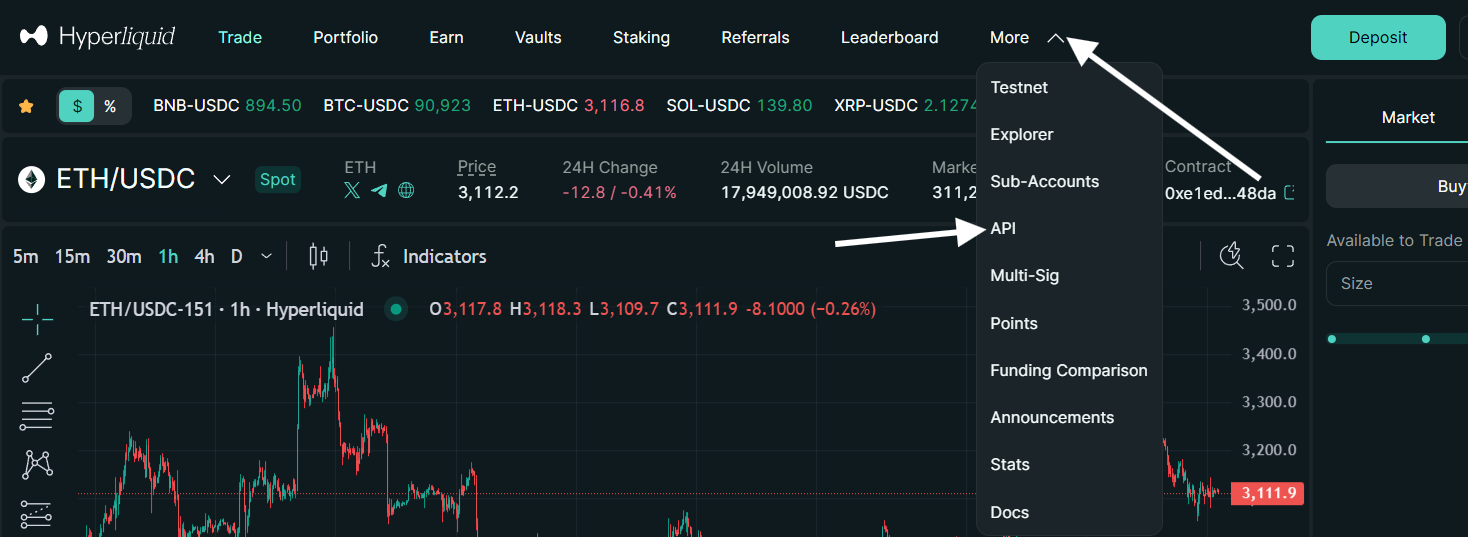
Log in to your Hyperliquid account. Click on "More" in the top menu, then select "API".
Step 2 — Create Your API Key
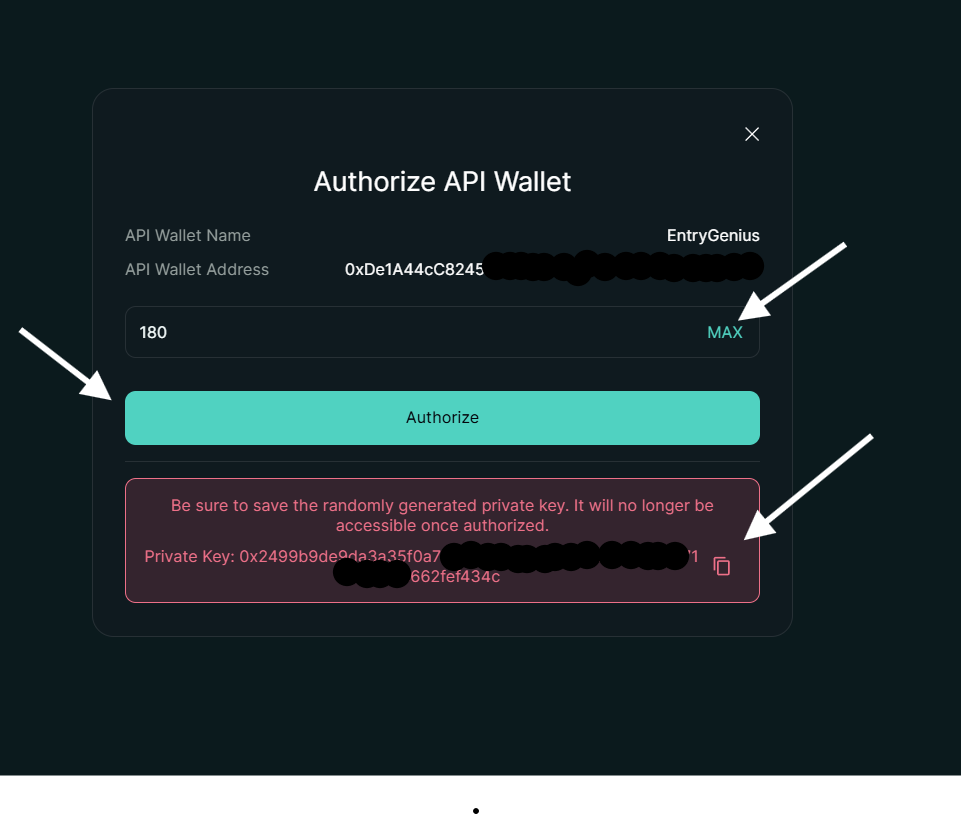
Enter a name for your API wallet (e.g., "EntryGenius"). Click "Generate" to create a new API key, then click "Authorize API Wallet".

Step 3 — Configure & Save Your Private Key
In the popup window:
- Set "Days Valid" to MAX (180 days) by clicking the "MAX" button
- ⚠️ IMPORTANT: Copy and save your Private Key — it will NOT be shown again!
- Click "Authorize" to activate your API key
Step 4 — Get Your Wallet Address
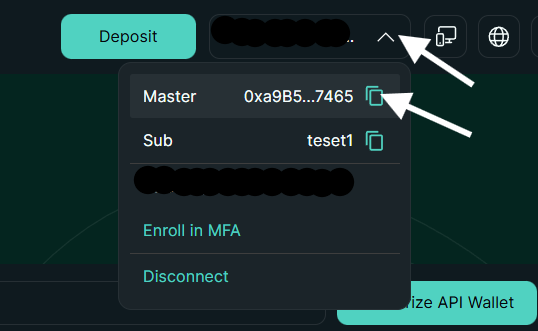
Click on your wallet address in the top-right corner of Hyperliquid. Copy your Master wallet address (the one that starts with 0x...).
Step 5 — Add Account to EntryGenius
Now go to your EntryGenius Accounts page:
- Click "Add Account"
- Enter a name (e.g., "My Hyperliquid")
- Paste your Wallet Address
- Paste your API Private Key
- Click "Add Account" — Done! ✅
💰 Where to Put Your Funds
The same API key works for both Futures and Spot trading. However, you need to have funds in the correct wallet depending on which features you want to use:
📈 Copy Trading (Futures)
- Funds must be in your Futures/Perps wallet
- Used for leveraged trading
- Our AI signals execute here automatically
🤖 DCA Bots (Spot)
- Funds must be in your Spot wallet
- Used for spot buying (no leverage)
- Bot accumulates crypto over time
⚠️ Using Multiple Bots on Same Asset
🚨 Important Warning
If you want to run multiple bots on the same asset (e.g., DCA Bot for BTC + Copy Trading signals for BTC), you should create separate accounts to avoid order conflicts.
- Same asset, different bots → Use 2 separate Hyperliquid accounts
- Different assets → One account is fine (e.g., DCA on ETH + Copy Trading on BTC)
This prevents orders from interfering with each other and keeps your positions clean.
❓ Frequently Asked Questions
Do I need separate API keys for Spot and Futures?
No! One API key works for both Spot and Futures trading. Just make sure you have funds in the correct wallet (Spot wallet for DCA Bots, Futures wallet for Copy Trading).
Which subscription do I need?
Premium unlocks DCA Bots. Pro unlocks Copy Trading + DCA Bots. Both work with the same Hyperliquid account setup.
Can I use sub-accounts?
No. Hyperliquid sub-accounts are not supported. You must use your main account to generate the API key.
My API key doesn't work
Make sure you: (1) Clicked "Authorize" after generating the key. (2) Copied the Private Key, not the wallet address. (3) Have funds in your Hyperliquid wallet.
How do I transfer funds between Spot and Futures?
In Hyperliquid, go to Portfolio → Transfer. You can move USDC between your Spot and Futures wallets instantly with no fees.
Is my API key safe?
Yes. Your API key is encrypted and stored securely. It can only execute trades — it cannot withdraw funds from your wallet.
Need help? Contact us on our live support. Trading involves risk. Past results do not guarantee future returns.